

Dropbox Sign API Documentation
Test how easy it is to customize and sign a document—try the demo.
The Dropbox Sign API offers a reliable, flexible set of eSignature tools that can be used to power digital agreements and turn slow, outdated business processes into a competitive advantage. With a broad range of highly-configurable features, the Dropbox Sign API empowers you to build secure signing experiences and document workflows that delight your users.
This documentation contains information and resources to help you build with the Dropbox Sign API. Here’s some of what you’ll find here:
- API Reference - comprehensive technical information and code examples for the entire Dropbox Sign API. Includes a Try it console to explore and test endpoints by sending API calls directly from the docs.
- Guides / Walkthroughs - in-depth information and tutorials about features, concepts, and use cases.
- Libraries - links to official Dropbox Sign SDKs.
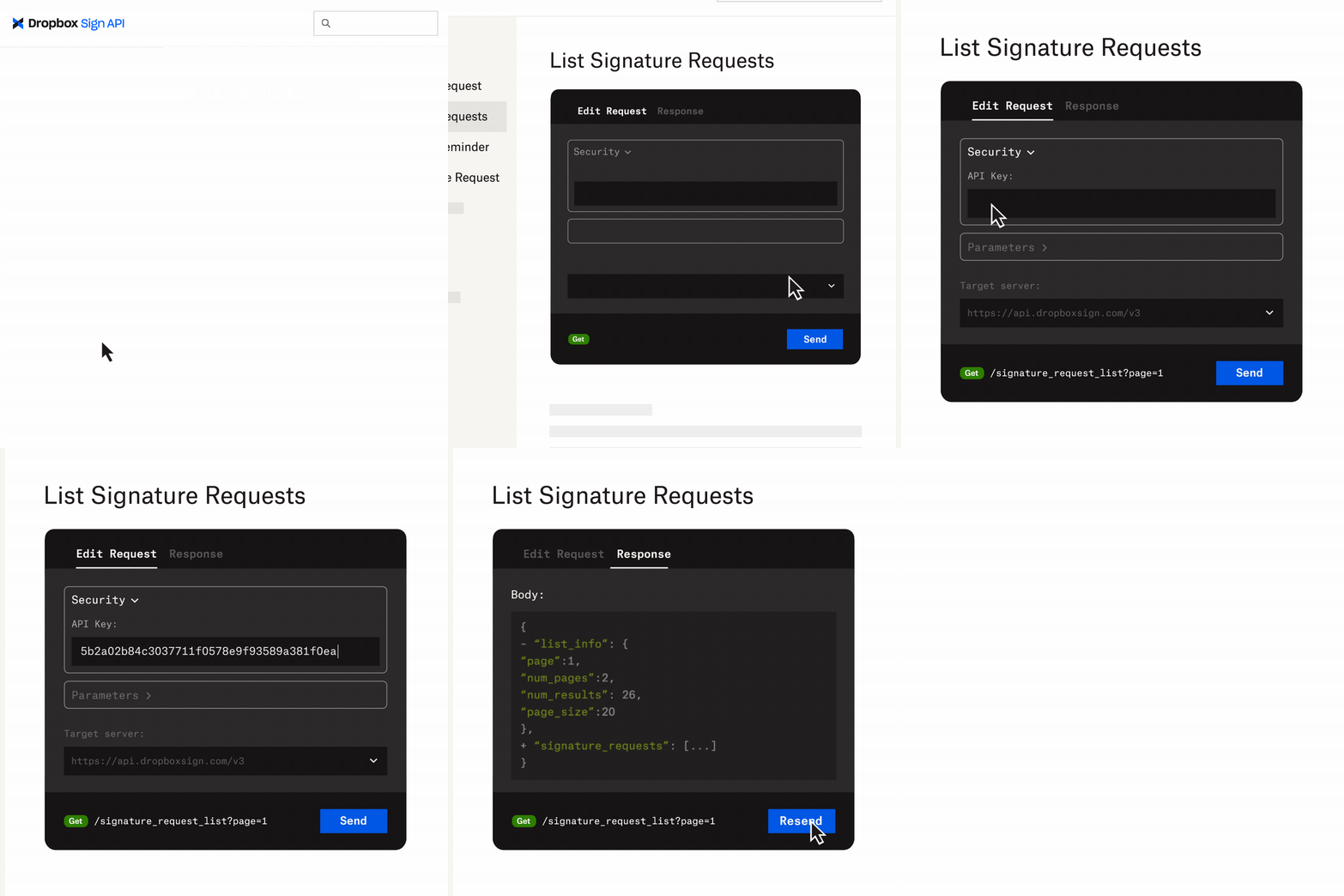
Testing the Dropbox Sign API
You can fully test every endpoint and almost every feature in the Dropbox Sign API (even from a free account) by setting test_mode to true on your API requests.
There are a few key behaviors to be aware of:
- Signature requests created in
test_modeare not legally binding and documents are watermarked as such. - Signature requests submitted in
test_modewill be visible in the Dropbox Sign accounts of requester and signers. Please consider the e-mail addresses you use when testing. - You can add custom branding that will be applied to calls sent with
test_mode. However, production requests will ignore those settings unless you’re subscribed to a Standard or Premium plan.
How we charge
Sending production (legally-binding) signature requests requires a paid API plan. The API will return a status code of 402 if such requests are made without a proper plan. We understand that you may want to test the API before paying for it. Some API endpoints are restricted to paid plans, but can still be used without signing up for a paid plan by using our test mode. See the Testing section above.
Endpoints by subscription plan
The endpoints below are organized by the subscription plan required to use them.
Rate Limits
To maximize stability for everyone, the Dropbox Sign API enforces rate limits on the number of API calls over a specific period of time. Exceeding the rate limits in this section may result in an error with a status code of 429.
By default, you can make up to 100 requests per minute for standard API requests, and 25 requests per minute for higher tier API requests. In test mode, you can do 10 requests per minute. Exceptions can be made for customers with higher volumes. Please contact us for more information.
Higher tier API endpoints:
- signature_request/send
- signature_request/send_with_template
- signature_request/bulk_send_with_template
- signature_request/create_embedded
- signature_request/create_embedded_with_template
- signature_request/bulk_create_embedded_with_template
- signature_request/files
- signature_request/files_as_data_uri
- signature_request/files_as_file_url
- template/files
- template/files_as_data_uri
- template/files_as_file_url
- template/create
- template/create_embedded_draft
- unclaimed_draft/create
- unclaimed_draft/create_embedded
- unclaimed_draft/create_embedded_with_template
Rate limit information is returned in the HTTP headers of any API request:
Use these headers to understand how your requests are being limited.
If your application triggers this rate limit, you’ll receive the following response:
Use the response headers and message above to limit your requests to the Dropbox Sign API. If you’re exceeding your rate limit frequently, you will receive an email notifying you of the overage. It is important to address these notifications, as excessive rate limit abuse will be addressed by blocking the offending account until the situation is resolved. Please contact us if you require a rate limit increase.
For the full list of error names, their HTTP status codes, causes, and retry guidance, see the Warnings and Errors reference. It is also published as machine-readable x-error-codes (HTTP errors) and x-error-events (asynchronous webhook errors) catalogs in the OpenAPI specification for programmatic use.
API Dashboard
Please visit our API Dashboard Guide for more information.
Quickstart
Ready to take your first steps with the Dropbox Sign API? We now offer an updated and interactive Quickstart guide that will introduce you to the Dropbox Sign API. Upon completion of the Quickstart guide, you should feel pretty comfortable sending signature requests!
We also recommend using the Try it console to send API calls directly from the endpoint you’d like to further explore.