***
description: >-
OAuth allows you to send signature requests and call the Dropbox Sign API on
behalf of your users. Click here to learn about Dropbox Sign's OAuth flows.
'og:description': >-
OAuth allows you to send signature requests and call the Dropbox Sign API on
behalf of your users. Click here to learn about Dropbox Sign's OAuth flows.
---------------------------------------------------------------------------
# OAuth Walkthrough
OAuth allows you to perform actions on behalf of other users after they grant you the authorization to do so. For example, you could send signature requests on behalf of your users. This page lays out the basic steps to build your own OAuth flow and send calls on behalf of your users using an access token.
## App Setup
### Create an app
Before you can do anything with OAuth, you'll need to [create an app](https://app.hellosign.com/oauth/createAppForm) and configure it to use OAuth.
#### App Settings
When creating an app, you'll need to provide the following information:
| Field | Description |
| ------------------ | ----------------------------------------------------------------------------------------------------------------------------------------------------- |
| App name | The name of your app. Public-facing and visible to your users. |
| OAuth callback URL | The URL that users are redirected to after authorizing your app. The `state` and `code` parameter are included in the url as query string parameters. |
| Event callback URL | The URL to which Dropbox Sign should POST events. See the [event section](/docs/events/overview/) for more info. |
| Scopes | Actions that your app will be allowed to perform on behalf of the granting user. |
#### Choosing Scopes
Scopes control the level of access granted to an access token. On your app settings page, choose the scopes that fit your particular use case for OAuth. Scopes are split up by billing model and organized around specific groups of actions (like signature requests). You can read more about them in the [Access Scopes](/docs/oauth/overview/#access-scopes) section of the OAuth Overview page.
#### App Approval
Dropbox Sign requires production approval for apps using OAuth. That means your app can't be authorized or added by other users *until it is approved for production*. When you feel your app is ready to go live, please follow the [app approval process](/docs/app-approval/overview/) to request approval for your app.
You can authorize your app from your own account while building with OAuth. This is the approach we recommend for testing and building your OAuth flow before submitting the app for production approval.
## Checking for a Dropbox Sign account
A user needs to authorize your app before an access token can be issued and used on their behalf. Dropbox Sign has an OAuth flow for two scenarios:
1. [Authorization code flow](#authorization-code-flow) — user has an existing Dropbox Sign account.
2. [Account creation flow](#account-creation-flow) — user is new to Dropbox Sign.
We recommend checking whether a user has a Dropbox Sign account ([/account/verify](/api/reference/operation/accountVerify/)) before selecting the corresponding flow:
```json title="Default Example"
{
"email_address": "some_user@dropboxsign.com"
}
```
{/*
```cURL cURL
curl -X POST 'https://api.hellosign.com/v3/account/verify' \
-u 'YOUR_API_KEY:' \
-F 'email_address=some_user@dropboxsign.com'
```
```php PHP
setUsername("YOUR_API_KEY");
// $config->setAccessToken("YOUR_ACCESS_TOKEN");
$account_verify_request = (new Dropbox\Sign\Model\AccountVerifyRequest())
->setEmailAddress("some_user@dropboxsign.com");
try {
$response = (new Dropbox\Sign\Api\AccountApi(config: $config))->accountVerify(
account_verify_request: $account_verify_request,
);
print_r($response);
} catch (Dropbox\Sign\ApiException $e) {
echo "Exception when calling AccountApi#accountVerify: {$e->getMessage()}";
}
```
```csharp C#
using System;
using System.Collections.Generic;
using System.IO;
using System.Text.Json;
using Dropbox.Sign.Api;
using Dropbox.Sign.Client;
using Dropbox.Sign.Model;
namespace Dropbox.SignSandbox;
public class AccountVerifyExample
{
public static void Run()
{
var config = new Configuration();
config.Username = "YOUR_API_KEY";
// config.AccessToken = "YOUR_ACCESS_TOKEN";
var accountVerifyRequest = new AccountVerifyRequest(
emailAddress: "some_user@dropboxsign.com"
);
try
{
var response = new AccountApi(config).AccountVerify(
accountVerifyRequest: accountVerifyRequest
);
Console.WriteLine(response);
}
catch (ApiException e)
{
Console.WriteLine("Exception when calling AccountApi#AccountVerify: " + e.Message);
Console.WriteLine("Status Code: " + e.ErrorCode);
Console.WriteLine(e.StackTrace);
}
}
}
```
```typescript TypeScript
import * as fs from 'fs';
import api from "@dropbox/sign"
import models from "@dropbox/sign"
const apiCaller = new api.AccountApi();
apiCaller.username = "YOUR_API_KEY";
// apiCaller.accessToken = "YOUR_ACCESS_TOKEN";
const accountVerifyRequest: models.AccountVerifyRequest = {
emailAddress: "some_user@dropboxsign.com",
};
apiCaller.accountVerify(
accountVerifyRequest,
).then(response => {
console.log(response.body);
}).catch(error => {
console.log("Exception when calling AccountApi#accountVerify:");
console.log(error.body);
});
```
```java Java
package com.dropbox.sign_sandbox;
import com.dropbox.sign.ApiException;
import com.dropbox.sign.Configuration;
import com.dropbox.sign.api.*;
import com.dropbox.sign.auth.*;
import com.dropbox.sign.JSON;
import com.dropbox.sign.model.*;
import java.io.File;
import java.math.BigDecimal;
import java.time.LocalDate;
import java.time.OffsetDateTime;
import java.util.ArrayList;
import java.util.List;
import java.util.Map;
public class AccountVerifyExample
{
public static void main(String[] args)
{
var config = Configuration.getDefaultApiClient();
((HttpBasicAuth) config.getAuthentication("api_key")).setUsername("YOUR_API_KEY");
// ((HttpBearerAuth) config.getAuthentication("oauth2")).setBearerToken("YOUR_ACCESS_TOKEN");
var accountVerifyRequest = new AccountVerifyRequest();
accountVerifyRequest.emailAddress("some_user@dropboxsign.com");
try
{
var response = new AccountApi(config).accountVerify(
accountVerifyRequest
);
System.out.println(response);
} catch (ApiException e) {
System.err.println("Exception when calling AccountApi#accountVerify");
System.err.println("Status code: " + e.getCode());
System.err.println("Reason: " + e.getResponseBody());
System.err.println("Response headers: " + e.getResponseHeaders());
e.printStackTrace();
}
}
}
```
```ruby Ruby
require "json"
require "dropbox-sign"
Dropbox::Sign.configure do |config|
config.username = "YOUR_API_KEY"
# config.access_token = "YOUR_ACCESS_TOKEN"
end
account_verify_request = Dropbox::Sign::AccountVerifyRequest.new
account_verify_request.email_address = "some_user@dropboxsign.com"
begin
response = Dropbox::Sign::AccountApi.new.account_verify(
account_verify_request,
)
p response
rescue Dropbox::Sign::ApiError => e
puts "Exception when calling AccountApi#account_verify: #{e}"
end
```
```python Python
import json
from datetime import date, datetime
from pprint import pprint
from dropbox_sign import ApiClient, ApiException, Configuration, api, models
configuration = Configuration(
username="YOUR_API_KEY",
# access_token="YOUR_ACCESS_TOKEN",
)
with ApiClient(configuration) as api_client:
account_verify_request = models.AccountVerifyRequest(
email_address="some_user@dropboxsign.com",
)
try:
response = api.AccountApi(api_client).account_verify(
account_verify_request=account_verify_request,
)
pprint(response)
except ApiException as e:
print("Exception when calling AccountApi#account_verify: %s\n" % e)
```
*/}
Response if the user has an account:
```json
{
"account": {
"account_id": "f57db65d3f933b5316d398057a36176831431a90",
"email_address": "user@example.com"
}
}
```
Response if the user does not have an account:
```json
{
"error": {
"error_msg": "Account not found",
"error_name": "not_found"
}
}
```
## Authorization Code Flow
Dropbox Sign recommends the [authorization code flow](https://developer.okta.com/blog/2018/04/10/oauth-authorization-code-grant-type) for generate access tokens for users that already have a Dropbox Sign account. Sometimes called the "3 legged OAuth flow", this approach consists of three distinct steps:
1. Obtaining consent from the user generates an authorization code.
2. The authorization code is exchanged for an access token using a token endpoint.
3. The access token is used to send API calls on behalf of the user according to the authorization they granted.
### Obtaining user authorization
Existing Dropbox Sign users can authorize your app by navigating to your app's authorization url. This url can be constructed manually in your code or you can copy it from the app details modal of your API settings page:
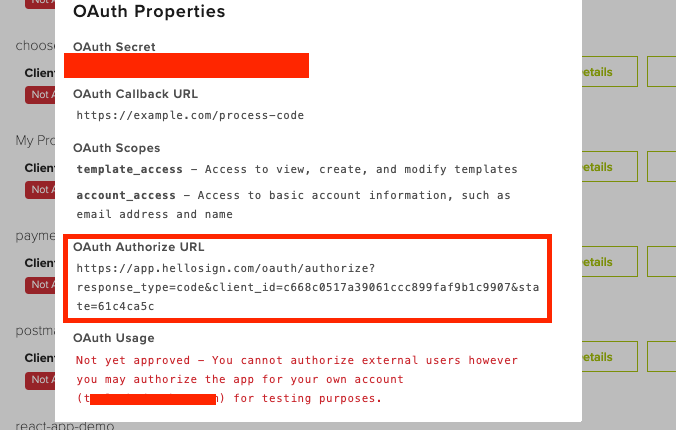 For example (line breaks for readability only):
```http
https://app.hellosign.com/oauth/authorize
?response_type=code
&client_id=cc91c61d00f8bb2ece1428035716b
&state=900e06e2
&redirect_uri=YOUR_APP_REDIRECT_URI
```
* The `state` parameter is used for security and must match throughout the flow for a given user. It can be set to the value of your choice (preferably something random). You **should verify** it matches the expected value before processing parameters on an OAuth callback.
* If `redirect_uri` is provided provided in the Authorization URL, the value must match the OAuth Callback URL specified in the API app settings. If `redirect_uri` is not provided, users will be redirected to the Default OAuth Callback URL.
Users grant their authorization on an OAuth consent page that shows them the name of your app and the level of access (scopes) being requested. They can choose to **Accept** or **Deny** the authorization request.
Both actions will redirect the user back to your OAuth callback URL. If the user clicked **Accept** and authorized your app then the URL will contain a `code` and `state` parameter. However, if they clicked **Deny**, then only the `state` parameter will be present and the OAuth flow cannot be completed.
Users must be logged into Dropbox Sign to authorize your app. They'll be prompted for login or sign up if they're not already signed in.
### Generating an Access Token
Once the user has given their consent and you've retrieved the authorization code from the url, you'll need to exchange it for an access token by calling the token endpoint. Make a POST request to [/oauth/token](/api/reference/operation/oauthTokenGenerate/) with the following parameters:
| Name | Value |
| --------------- | ------------------------------------------------------------- |
| `state` | Same as the state you specified earlier |
| `code` | The code passed to your callback when the user granted access |
| `grant_type` | String value of "authorization\_code" |
| `client_id` | The client id of your app |
| `client_secret` | The secret token of your app |
#### Example
```json title="OAuth Token Generate Example"
{
"state": "900e06e2",
"code": "1b0d28d90c86c141",
"grant_type": "authorization_code",
"client_id": "cc91c61d00f8bb2ece1428035716b",
"client_secret": "1d14434088507ffa390e6f5528465"
}
```
{/*
```cURL cURL
curl -X POST 'https://app.hellosign.com/oauth/token' \
-F 'client_id=YOUR_CLIENT_ID' \
-F 'state=900e06e2' \
-F 'code=1b0d28d90c86c141' \
-F 'grant_type=authorization_code' \
-F 'client_secret=1d14434088507ffa390e6f5528465'
```
```php PHP
setClientId("cc91c61d00f8bb2ece1428035716b")
->setClientSecret("1d14434088507ffa390e6f5528465")
->setCode("1b0d28d90c86c141")
->setState("900e06e2")
->setGrantType("authorization_code");
try {
$response = (new Dropbox\Sign\Api\OAuthApi(config: $config))->oauthTokenGenerate(
o_auth_token_generate_request: $o_auth_token_generate_request,
);
print_r($response);
} catch (Dropbox\Sign\ApiException $e) {
echo "Exception when calling OAuthApi#oauthTokenGenerate: {$e->getMessage()}";
}
```
```csharp C#
using System;
using System.Collections.Generic;
using System.IO;
using System.Text.Json;
using Dropbox.Sign.Api;
using Dropbox.Sign.Client;
using Dropbox.Sign.Model;
namespace Dropbox.SignSandbox;
public class OauthTokenGenerateExample
{
public static void Run()
{
var config = new Configuration();
var oAuthTokenGenerateRequest = new OAuthTokenGenerateRequest(
clientId: "cc91c61d00f8bb2ece1428035716b",
clientSecret: "1d14434088507ffa390e6f5528465",
code: "1b0d28d90c86c141",
state: "900e06e2",
grantType: "authorization_code"
);
try
{
var response = new OAuthApi(config).OauthTokenGenerate(
oAuthTokenGenerateRequest: oAuthTokenGenerateRequest
);
Console.WriteLine(response);
}
catch (ApiException e)
{
Console.WriteLine("Exception when calling OAuthApi#OauthTokenGenerate: " + e.Message);
Console.WriteLine("Status Code: " + e.ErrorCode);
Console.WriteLine(e.StackTrace);
}
}
}
```
```typescript TypeScript
import * as fs from 'fs';
import api from "@dropbox/sign"
import models from "@dropbox/sign"
const apiCaller = new api.OAuthApi();
const oAuthTokenGenerateRequest: models.OAuthTokenGenerateRequest = {
clientId: "cc91c61d00f8bb2ece1428035716b",
clientSecret: "1d14434088507ffa390e6f5528465",
code: "1b0d28d90c86c141",
state: "900e06e2",
grantType: "authorization_code",
};
apiCaller.oauthTokenGenerate(
oAuthTokenGenerateRequest,
).then(response => {
console.log(response.body);
}).catch(error => {
console.log("Exception when calling OAuthApi#oauthTokenGenerate:");
console.log(error.body);
});
```
```java Java
package com.dropbox.sign_sandbox;
import com.dropbox.sign.ApiException;
import com.dropbox.sign.Configuration;
import com.dropbox.sign.api.*;
import com.dropbox.sign.auth.*;
import com.dropbox.sign.JSON;
import com.dropbox.sign.model.*;
import java.io.File;
import java.math.BigDecimal;
import java.time.LocalDate;
import java.time.OffsetDateTime;
import java.util.ArrayList;
import java.util.List;
import java.util.Map;
public class OauthTokenGenerateExample
{
public static void main(String[] args)
{
var config = Configuration.getDefaultApiClient();
var oAuthTokenGenerateRequest = new OAuthTokenGenerateRequest();
oAuthTokenGenerateRequest.clientId("cc91c61d00f8bb2ece1428035716b");
oAuthTokenGenerateRequest.clientSecret("1d14434088507ffa390e6f5528465");
oAuthTokenGenerateRequest.code("1b0d28d90c86c141");
oAuthTokenGenerateRequest.state("900e06e2");
oAuthTokenGenerateRequest.grantType("authorization_code");
try
{
var response = new OAuthApi(config).oauthTokenGenerate(
oAuthTokenGenerateRequest
);
System.out.println(response);
} catch (ApiException e) {
System.err.println("Exception when calling OAuthApi#oauthTokenGenerate");
System.err.println("Status code: " + e.getCode());
System.err.println("Reason: " + e.getResponseBody());
System.err.println("Response headers: " + e.getResponseHeaders());
e.printStackTrace();
}
}
}
```
```ruby Ruby
require "json"
require "dropbox-sign"
Dropbox::Sign.configure do |config|
end
o_auth_token_generate_request = Dropbox::Sign::OAuthTokenGenerateRequest.new
o_auth_token_generate_request.client_id = "cc91c61d00f8bb2ece1428035716b"
o_auth_token_generate_request.client_secret = "1d14434088507ffa390e6f5528465"
o_auth_token_generate_request.code = "1b0d28d90c86c141"
o_auth_token_generate_request.state = "900e06e2"
o_auth_token_generate_request.grant_type = "authorization_code"
begin
response = Dropbox::Sign::OAuthApi.new.oauth_token_generate(
o_auth_token_generate_request,
)
p response
rescue Dropbox::Sign::ApiError => e
puts "Exception when calling OAuthApi#oauth_token_generate: #{e}"
end
```
```python Python
import json
from datetime import date, datetime
from pprint import pprint
from dropbox_sign import ApiClient, ApiException, Configuration, api, models
configuration = Configuration(
)
with ApiClient(configuration) as api_client:
o_auth_token_generate_request = models.OAuthTokenGenerateRequest(
client_id="cc91c61d00f8bb2ece1428035716b",
client_secret="1d14434088507ffa390e6f5528465",
code="1b0d28d90c86c141",
state="900e06e2",
grant_type="authorization_code",
)
try:
response = api.OAuthApi(api_client).oauth_token_generate(
o_auth_token_generate_request=o_auth_token_generate_request,
)
pprint(response)
except ApiException as e:
print("Exception when calling OAuthApi#oauth_token_generate: %s\n" % e)
```
*/}
```json
{
"access_token": "1a2b3c4d5e6f7g8h9i0j",
"token_type": "Bearer",
"expires_in": 3600,
"refresh_token": "9i8h7g6f5e4d3c2b1a0",
"account_id": "f57db65d3f933b5316d398057a36176831431a90"
}
```
At the end of a successful Authorization Code flow, you'll receive a payload that contains an `access_token`, which can be used to send API calls on behalf of the user that authorized your app. You can see how to use it in the [Making API Calls with Access Tokens](#making-api-calls-with-access-tokens) section below.
Access tokens are only valid for about an hour. You'll want to securely store the `refresh_token`, which can be used later to generate a new access token without forcing the user to complete another OAuth flow. Please refer to the [Refreshing an Access Token](#refreshing-an-access-token) section.
## Account Creation Flow
When a user *without a Dropbox Sign account* visits your authorization url, they'll need to sign up from that page before they can authorize your app. It's possible to do that, but we also offer an approach. You can create the users Dropbox Sign account and get the access token at the same time. However, the access token **will not work** until the user has confirmed their account and authorized your app.
Your app must be approved for production before this flow is possible.
### Create account
The first step is calling [/account/create](/api/reference/operation/accountCreate/) and passing your API app's `client_id` and `client_secret`.
#### Example
```bash cURL
curl 'https://api.hellosign.com/v3/account/create' \
-u '0ca97430f712bd3898e782000d4387c60c464155afbdb49d1fddda27c7443b98:' \
-F 'email_address=jill@example.com' \
-F 'client_id=cc91c61d00f8bb2ece1428035716b' \
-F 'client_secret=1d14434088507ffa390e6f5528465'
```
```php
setUsername("YOUR_API_KEY");
// Configure Bearer authorization: oauth2
// $config->setAccessToken("YOUR_ACCESS_TOKEN");
$accountApi = new Dropbox\Sign\Api\AccountApi($config);
$data = new Dropbox\Sign\Model\AccountCreateRequest();
$data->setEmailAddress("oauthuser@dropbox.com")
->setClientId("cc91c61d00f8bb2ece1428035716b")
->setClientSecret("1d14434088507ffa390e6f5528465");
try {
$result = $accountApi->accountCreate($data);
print_r($result);
} catch (Dropbox\Sign\ApiException $e) {
$error = $e->getResponseObject();
echo "Exception when calling Dropbox Sign API: "
. print_r($error->getError());
}
```
```java
import com.dropbox.sign.ApiException;
import com.dropbox.sign.Configuration;
import com.dropbox.sign.api.*;
import com.dropbox.sign.auth.*;
import com.dropbox.sign.model.*;
public class Example {
public static void main(String[] args) {
var apiClient = Configuration.getDefaultApiClient();
// Configure HTTP basic authorization: api_key
var apiKey = (HttpBasicAuth) apiClient
.getAuthentication("api_key");
apiKey.setUsername("YOUR_API_KEY");
// or, configure Bearer authorization: oauth2
/*
var oauth2 = (HttpBearerAuth) apiClient
.getAuthentication("oauth2");
oauth2.setBearerToken("YOUR_ACCESS_TOKEN");
*/
var accountApi = new AccountApi(apiClient);
var data = new AccountCreateRequest()
.emailAddress("oauthuser@dropbox.com")
.clientId("cc91c61d00f8bb2ece1428035716b")
clientSecret("1d14434088507ffa390e6f5528465");
try {
AccountCreateResponse result = accountApi.accountCreate(data);
System.out.println(result);
} catch (ApiException e) {
System.err.println("Exception when calling AccountApi#accountCreate");
System.err.println("Status code: " + e.getCode());
System.err.println("Reason: " + e.getResponseBody());
System.err.println("Response headers: " + e.getResponseHeaders());
e.printStackTrace();
}
}
}
```
```python
from pprint import pprint
from dropbox_sign import \
ApiClient, ApiException, Configuration, apis, models
configuration = Configuration(
# Configure HTTP basic authorization: api_key
username="YOUR_API_KEY",
)
with ApiClient(configuration) as api_client:
account_api = apis.AccountApi(api_client)
data = models.AccountCreateRequest(
email_address="oauthuser@dropbox.com",
client_id="cc91c61d00f8bb2ece1428035716b",
client_secret="1d14434088507ffa390e6f5528465"
)
try:
response = account_api.account_create(data)
pprint(response)
except ApiException as e:
print("Exception when calling Dropbox Sign API: %s\n" % e)
```
```ruby
require "dropbox-sign"
Dropbox::Sign.configure do |config|
# Configure HTTP basic authorization: api_key
config.username = "YOUR_API_KEY"
# or, configure Bearer authorization: oauth2
# config.access_token = "YOUR_ACCESS_TOKEN"
end
account_api = Dropbox::Sign::AccountApi.new
data = Dropbox::Sign::AccountCreateRequest.new
data.email_address = "oauthuser@dropbox.com"
data.client_id = "cc91c61d00f8bb2ece1428035716b"
data.client_secret = "1d14434088507ffa390e6f5528465"
begin
result = account_api.account_create(data)
p result
rescue Dropbox::Sign::ApiError => e
puts "Exception when calling Dropbox Sign API: #{e}"
end
```
```js nodejs
import * as DropboxSign from "@dropbox/sign";
const accountApi = new DropboxSign.AccountApi();
// Configure HTTP basic authorization: api_key
accountApi.username = "YOUR_API_KEY";
// or, configure Bearer authorization: oauth2
// accountApi.accessToken = "YOUR_ACCESS_TOKEN";
const data = {
emailAddress: "oauthuser@dropbox.com",
clientId: "cc91c61d00f8bb2ece1428035716b",
clientSecret: "1d14434088507ffa390e6f5528465"
};
const result = accountApi.accountCreate(data);
result.then(response => {
console.log(response.body);
}).catch(error => {
console.log("Exception when calling Dropbox Sign API:");
console.log(error.body);
});
```
```cs C#
using System;
using Dropbox.Sign.Api;
using Dropbox.Sign.Client;
using Dropbox.Sign.Model;
public class Example
{
public static void Main()
{
var config = new Configuration();
// Configure HTTP basic authorization: api_key
config.Username = "YOUR_API_KEY";
// or, configure Bearer authorization: oauth2
// config.AccessToken = "YOUR_BEARER_TOKEN";
var accountApi = new AccountApi(config);
var data = new AccountCreateRequest(
emailAddress: "oauthuser@dropbox.com",
clientId: "cc91c61d00f8bb2ece1428035716b",
clientSecret: "1d14434088507ffa390e6f5528465"
);
try
{
var result = accountApi.AccountCreate(data);
Console.WriteLine(result);
}
catch (ApiException e)
{
Console.WriteLine("Exception when calling Dropbox Sign API: " + e.Message);
Console.WriteLine("Status Code: " + e.ErrorCode);
Console.WriteLine(e.StackTrace);
}
}
}
```
### User confirms account
The user is sent an email from Dropbox Sign with a hyperlink to confirm their account activation. Once the user accesses Dropbox Sign, they're prompted to authorize your Dropbox Sign app.
The user must complete this step for this flow to work. The `access_token` **will not work** until the user has activated their account and authorized your app.
Once the new user has approved your app, the `access_token` can be used to call the Dropbox Sign API on their behalf. The `refresh_token` should also be saved and used once the access token expires.
## Making API Calls With Access Tokens
Now that you have an `access_token`, you can make API calls on behalf of other users. When making API calls, you'll need to pass the access token by setting the HTTP header `Authorization: Bearer `.
By design, your app's visibility into customer activity is limited to signature requests created using your API app. You can't see any signature requests that the user sends directly from their own account.
#### Example
```bash curl
curl 'https://api.hellosign.com/v3/signature_request/list' \
-H 'Authorization: Bearer NWNiOTMxOGFkOGVjMDhhNTAxZN2NkNjgxMjMwOWJiYTEzZTBmZGUzMjMThhMzYyMzc='
```
```php
setAccessToken("NWNiOTMxOGFkOGVjMDhhNTAxZN2NkNjgxMjMwOWJiYTEzZTBmZGUzMjMThhMzYyMzc=");
$signatureRequestApi = new Dropbox\Sign\Api\SignatureRequestApi($config);
$accountId = null;
$page = 1;
try {
$result = $signatureRequestApi->signatureRequestList($accountId, $page);
print_r($result);
} catch (Dropbox\Sign\ApiException $e) {
$error = $e->getResponseObject();
echo "Exception when calling Dropbox Sign API: "
. print_r($error->getError());
}
```
```java
import com.dropbox.sign.ApiException;
import com.dropbox.sign.Configuration;
import com.dropbox.sign.api.*;
import com.dropbox.sign.auth.*;
import com.dropbox.sign.model.*;
public class Example {
public static void main(String[] args) {
var apiClient = Configuration.getDefaultApiClient();
// Configure Bearer authorization: oauth2
var oauth2 = (HttpBearerAuth) apiClient
.getAuthentication("oauth2");
oauth2.setBearerToken("NWNiOTMxOGFkOGVjMDhhNTAxZN2NkNjgxMjMwOWJiYTEzZTBmZGUzMjMThhMzYyMzc=");
var signatureRequestApi = new SignatureRequestApi(oauth2);
var accountId = "accountId";
var page = 1;
var pageSize = 20;
String query = null;
try {
SignatureRequestListResponse result = signatureRequestApi.signatureRequestList(
accountId,
page,
pageSize,
query
);
System.out.println(result);
} catch (ApiException e) {
System.err.println("Exception when calling AccountApi#accountCreate");
System.err.println("Status code: " + e.getCode());
System.err.println("Reason: " + e.getResponseBody());
System.err.println("Response headers: " + e.getResponseHeaders());
e.printStackTrace();
}
}
}
```
```python
from pprint import pprint
from dropbox_sign import \
ApiClient, ApiException, Configuration, apis
configuration = Configuration(
# Configure Bearer authorization: oauth2
access_token="NWNiOTMxOGFkOGVjMDhhNTAxZN2NkNjgxMjMwOWJiYTEzZTBmZGUzMjMThhMzYyMzc=",
)
with ApiClient(configuration) as api_client:
signature_request_api = apis.SignatureRequestApi(api_client)
account_id = None
page = 1
try:
response = signature_request_api.signature_request_list(
account_id=account_id,
page=page,
)
pprint(response)
except ApiException as e:
print("Exception when calling Dropbox Sign API: %s\n" % e)
```
```ruby
require "dropbox-sign"
Dropbox::Sign.configure do |config|
# Configure Bearer authorization: oauth2
config.access_token = "NWNiOTMxOGFkOGVjMDhhNTAxZN2NkNjgxMjMwOWJiYTEzZTBmZGUzMjMThhMzYyMzc="
end
signature_request_api = Dropbox::Sign::SignatureRequestApi.new
data = Dropbox::Sign::SignatureRequestSendRequest.new
data.title = "NDA with Acme Co."
data.subject = "The NDA we talked about"
data.message = "Please sign this NDA and then we can discuss more. Let me know if you have any questions."
data.signers = [
Dropbox::Sign::SubSignatureRequestSigner.new(
email_address: "jack@example.com",
name: "Jack",
order: 0
),
Dropbox::Sign::SubSignatureRequestSigner.new(
email_address: "jill@example.com",
name: "Jill",
order: 1
)
]
data.cc_email_addresses = [
"lawyer1@dropboxsign.com",
"lawyer2@dropboxsign.com",
]
data.files = [
open("example_signature_request.pdf"),
open("AppendixA.pdf")
]
data.metadata = {
custom_id: 1234,
custom_text: "NDA #9",
}
data.signing_options = Dropbox::Sign::SubSigningOptions.new(
draw: true,
type: true,
upload: true,
phone: false,
default_type: "draw"
)
data.field_options = Dropbox::Sign::SubFieldOptions.new(
date_format: "DD - MM - YYYY"
)
data.test_mode = true
begin
result = signature_request_api.signature_request_send(data)
p result
rescue Dropbox::Sign::ApiError => e
puts "Exception when calling Dropbox Sign API: #{e}"
end
```
```js nodejs
import * as DropboxSign from "@dropbox/sign";
const signatureRequestApi = new DropboxSign.SignatureRequestApi();
// Configure Bearer authorization: oauth2
signatureRequestApi.accessToken = "NWNiOTMxOGFkOGVjMDhhNTAxZN2NkNjgxMjMwOWJiYTEzZTBmZGUzMjMThhMzYyMzc=";
const accountId = null;
const page = 1;
const result = signatureRequestApi.signatureRequestList(accountId, page);
result.then(response => {
console.log(response.body);
}).catch(error => {
console.log("Exception when calling Dropbox Sign API:");
console.log(error.body);
});
```
```cs C#
using System;
using System.Collections.Generic;
using Dropbox.Sign.Api;
using Dropbox.Sign.Client;
using Dropbox.Sign.Model;
public class Example
{
public static void Main()
{
var config = new Configuration();
// Configure Bearer authorization: oauth2
config.AccessToken = "NWNiOTMxOGFkOGVjMDhhNTAxZN2NkNjgxMjMwOWJiYTEzZTBmZGUzMjMThhMzYyMzc=";
var signatureRequestApi = new SignatureRequestApi(config);
var accountId = "accountId";
try
{
var result = signatureRequestApi.SignatureRequestList(accountId);
Console.WriteLine(result);
}
catch (ApiException e)
{
Console.WriteLine("Exception when calling Dropbox Sign API: " + e.Message);
Console.WriteLine("Status Code: " + e.ErrorCode);
Console.WriteLine(e.StackTrace);
}
}
}
```
### Signature Request with Access Token
For this example, let's send a non-embedded signature request ([/signature\_request/send](/api/reference/operation/signatureRequestSend/)) and replace the [basic auth](/api/reference/authentication/#api-key) with an access token.
#### Example
```bash curl
curl 'https://api.hellosign.com/v3/signature_request/send' \
-H 'Authorization: Bearer NWNiOTMxOGFkOGVjMDhhNTAxZN2NkNjgxMjMwOWJiYTEzZTBmZGUzMjMThhMzYyMzc=' \
-F 'title=NDA with Acme Co.' \
-F 'subject=The NDA we talked about' \
-F 'message=Please sign this NDA and then we can discuss more. Let me know if you have any questions.' \
-F 'signers[0][email_address]=jack@example.com' \
-F 'signers[0][name]=Jack' \
-F 'signers[0][order]=0' \
-F 'signers[1][email_address]=jill@example.com' \
-F 'signers[1][name]=Jill' \
-F 'signers[1][order]=1' \
-F 'cc_email_addresses[0]=lawyer@example.com' \
-F 'cc_email_addresses[1]=lawyer2@example.com' \
-F 'file[0]=@NDA.pdf' \
-F 'file[1]=@AppendixA.pdf' \
-F 'test_mode=1'
```
```php
setAccessToken("NWNiOTMxOGFkOGVjMDhhNTAxZN2NkNjgxMjMwOWJiYTEzZTBmZGUzMjMThhMzYyMzc=");
$signatureRequestApi = new Dropbox\Sign\Api\SignatureRequestApi($config);
$signer1 = new Dropbox\Sign\Model\SubSignatureRequestSigner();
$signer1->setEmailAddress("jack@example.com")
->setName("Jack")
->setOrder(0);
$signer2 = new Dropbox\Sign\Model\SubSignatureRequestSigner();
$signer2->setEmailAddress("jill@example.com")
->setName("Jill")
->setOrder(1);
$signingOptions = new Dropbox\Sign\Model\SubSigningOptions();
$signingOptions->setDraw(true)
->setType(true)
->setUpload(true)
->setPhone(false)
->setDefaultType(Dropbox\Sign\Model\SubSigningOptions::DEFAULT_TYPE_DRAW);
$fieldOptions = new Dropbox\Sign\Model\SubFieldOptions();
$fieldOptions->setDateFormat(Dropbox\Sign\Model\SubFieldOptions::DATE_FORMAT_DD_MM_YYYY);
$data = new Dropbox\Sign\Model\SignatureRequestSendRequest();
$data->setTitle("NDA with Acme Co.")
->setSubject("The NDA we talked about")
->setMessage("Please sign this NDA and then we can discuss more. Let me know if you have any questions.")
->setSigners([$signer1, $signer2])
->setCcEmailAddresses([
"lawyer1@dropboxsign.com",
"lawyer2@dropboxsign.com",
])
->setFiles([new SplFileObject(__DIR__ . "/example_signature_request.pdf")])
->setMetadata([
"custom_id" => 1234,
"custom_text" => "NDA #9",
])
->setSigningOptions($signingOptions)
->setFieldOptions($fieldOptions)
->setTestMode(true);
try {
$result = $signatureRequestApi->signatureRequestSend($data);
print_r($result);
} catch (Dropbox\Sign\ApiException $e) {
$error = $e->getResponseObject();
echo "Exception when calling Dropbox Sign API: "
. print_r($error->getError());
}
```
```java
import com.dropbox.sign.ApiException;
import com.dropbox.sign.Configuration;
import com.dropbox.sign.api.*;
import com.dropbox.sign.auth.*;
import com.dropbox.sign.model.*;
import java.io.File;
import java.util.List;
import java.util.Map;
public class Example {
public static void main(String[] args) {
var apiClient = Configuration.getDefaultApiClient();
// Configure Bearer authorization: oauth2
var oauth2 = (HttpBearerAuth) apiClient
.getAuthentication("oauth2");
oauth2.setBearerToken("NWNiOTMxOGFkOGVjMDhhNTAxZN2NkNjgxMjMwOWJiYTEzZTBmZGUzMjMThhMzYyMzc=");
var signatureRequestApi = new SignatureRequestApi(oauth2);
var signer1 = new SubSignatureRequestSigner()
.emailAddress("jack@example.com")
.name("Jack")
.order(0);
var signer2 = new SubSignatureRequestSigner()
.emailAddress("jill@example.com")
.name("Jill")
.order(1);
var signingOptions = new SubSigningOptions()
.draw(true)
.type(true)
.upload(true)
.phone(true)
.defaultType(SubSigningOptions.DefaultTypeEnum.DRAW);
var subFieldOptions = new SubFieldOptions()
.dateFormat(SubFieldOptions.DateFormatEnum.DDMMYYYY);
var data = new SignatureRequestSendRequest()
.title("NDA with Acme Co.")
.subject("The NDA we talked about")
.message("Please sign this NDA and then we can discuss more. Let me know if you have any questions.")
.signers(List.of(signer1, signer2))
.ccEmailAddresses(List.of("lawyer1@dropboxsign.com", "lawyer2@dropboxsign.com"))
.addFilesItem(new File("example_signature_request.pdf"))
.metadata(Map.of("custom_id", 1234, "custom_text", "NDA #9"))
.signingOptions(signingOptions)
.fieldOptions(subFieldOptions)
.testMode(true);
try {
SignatureRequestGetResponse result = signatureRequestApi.signatureRequestSend(data);
System.out.println(result);
} catch (ApiException e) {
System.err.println("Exception when calling AccountApi#accountCreate");
System.err.println("Status code: " + e.getCode());
System.err.println("Reason: " + e.getResponseBody());
System.err.println("Response headers: " + e.getResponseHeaders());
e.printStackTrace();
}
}
}
```
```python
from pprint import pprint
from dropbox_sign import \
ApiClient, ApiException, Configuration, apis, models
configuration = Configuration(
# Configure Bearer authorization: oauth2
access_token="NWNiOTMxOGFkOGVjMDhhNTAxZN2NkNjgxMjMwOWJiYTEzZTBmZGUzMjMThhMzYyMzc=",
)
with ApiClient(configuration) as api_client:
signature_request_api = apis.SignatureRequestApi(api_client)
signer_1 = models.SubSignatureRequestSigner(
email_address="jack@example.com",
name="Jack",
order=0,
)
signer_2 = models.SubSignatureRequestSigner(
email_address="jill@example.com",
name="Jill",
order=1,
)
signing_options = models.SubSigningOptions(
draw=True,
type=True,
upload=True,
phone=True,
default_type="draw",
)
field_options = models.SubFieldOptions(
date_format="DD - MM - YYYY",
)
data = models.SignatureRequestSendRequest(
title="NDA with Acme Co.",
subject="The NDA we talked about",
message="Please sign this NDA and then we can discuss more. Let me know if you have any questions.",
signers=[signer_1, signer_2],
cc_email_addresses=[
"lawyer1@dropboxsign.com",
"lawyer2@dropboxsign.com",
],
files=[open("example_signature_request.pdf", "rb")],
metadata={
"custom_id": 1234,
"custom_text": "NDA #9",
},
signing_options=signing_options,
field_options=field_options,
test_mode=True,
)
try:
response = signature_request_api.signature_request_send(data)
pprint(response)
except ApiException as e:
print("Exception when calling Dropbox Sign API: %s\n" % e)
```
```ruby
require "dropbox-sign"
Dropbox::Sign.configure do |config|
# Configure Bearer authorization: oauth2
config.access_token = "NWNiOTMxOGFkOGVjMDhhNTAxZN2NkNjgxMjMwOWJiYTEzZTBmZGUzMjMThhMzYyMzc="
end
signature_request_api = Dropbox::Sign::SignatureRequestApi.new
signer_1 = Dropbox::Sign::SubSignatureRequestSigner.new
signer_1.email_address = "jack@example.com"
signer_1.name = "Jack"
signer_1.order = 0
signer_2 = Dropbox::Sign::SubSignatureRequestSigner.new
signer_2.email_address = "jill@example.com"
signer_2.name = "Jill"
signer_2.order = 1
signing_options = Dropbox::Sign::SubSigningOptions.new
signing_options.draw = true
signing_options.type = true
signing_options.upload = true
signing_options.phone = true
signing_options.default_type = "draw"
field_options = Dropbox::Sign::SubFieldOptions.new
field_options.date_format = "DD - MM - YYYY"
data = Dropbox::Sign::SignatureRequestSendRequest.new
data.title = "NDA with Acme Co."
data.subject = "The NDA we talked about"
data.message = "Please sign this NDA and then we can discuss more. Let me know if you have any questions."
data.signers = [signer_1, signer_2]
data.cc_email_addresses = [
"lawyer1@dropboxsign.com",
"lawyer2@dropboxsign.com",
]
data.files = [open("example_signature_request.pdf")]
data.metadata = {
custom_id: 1234,
custom_text: "NDA #9",
}
data.signing_options = signing_options
data.field_options = field_options
data.test_mode = true
begin
result = signature_request_api.signature_request_send(data)
p result
rescue Dropbox::Sign::ApiError => e
puts "Exception when calling Dropbox Sign API: #{e}"
end
```
```js nodejs
import * as DropboxSign from "@dropbox/sign";
const fs = require('fs');
const signatureRequestApi = new DropboxSign.SignatureRequestApi();
// Configure Bearer authorization: oauth2
signatureRequestApi.accessToken = "NWNiOTMxOGFkOGVjMDhhNTAxZN2NkNjgxMjMwOWJiYTEzZTBmZGUzMjMThhMzYyMzc=";
const signer1 = {
emailAddress: "jack@example.com",
name: "Jack",
order: 0,
};
const signer2 = {
emailAddress: "jill@example.com",
name: "Jill",
order: 1,
};
const signingOptions = {
draw: true,
type: true,
upload: true,
phone: false,
defaultType: "draw",
};
const fieldOptions = {
dateFormat: "DD - MM - YYYY",
};
// Upload a local file
const file = fs.createReadStream("example_signature_request.pdf");
// or, upload from buffer
const fileBuffer = {
value: fs.readFileSync("example_signature_request.pdf"),
options: {
filename: "example_signature_request.pdf",
contentType: "application/pdf",
},
};
// or, upload from buffer alternative
const fileBufferAlt = {
value: Buffer.from("abc-123"),
options: {
filename: "txt-sample.txt",
contentType: "text/plain",
},
};
const data = {
title: "NDA with Acme Co.",
subject: "The NDA we talked about",
message: "Please sign this NDA and then we can discuss more. Let me know if you have any questions.",
signers: [ signer1, signer2 ],
ccEmailAddresses: [
"lawyer1@dropboxsign.com",
"lawyer2@example.com",
],
files: [ file, fileBuffer, fileBufferAlt ],
metadata: {
"custom_id": 1234,
"custom_text": "NDA #9",
},
signingOptions,
fieldOptions,
testMode: true,
};
const result = signatureRequestApi.signatureRequestSend(data);
result.then(response => {
console.log(response.body);
}).catch(error => {
console.log("Exception when calling Dropbox Sign API:");
console.log(error.body);
});
```
```cs C#
using System;
using System.Collections.Generic;
using Dropbox.Sign.Api;
using Dropbox.Sign.Client;
using Dropbox.Sign.Model;
public class Example
{
public static void Main()
{
var config = new Configuration();
// Configure Bearer authorization: oauth2
config.AccessToken = "NWNiOTMxOGFkOGVjMDhhNTAxZN2NkNjgxMjMwOWJiYTEzZTBmZGUzMjMThhMzYyMzc=";
var signatureRequestApi = new SignatureRequestApi(config);
var signer1 = new SubSignatureRequestSigner(
emailAddress: "jack@example.com",
name: "Jack",
order: 0
);
var signer2 = new SubSignatureRequestSigner(
emailAddress: "jill@example.com",
name: "Jill",
order: 1
);
var signingOptions = new SubSigningOptions(
draw: true,
type: true,
upload: true,
phone: true,
defaultType: SubSigningOptions.DefaultTypeEnum.Draw
);
var subFieldOptions = new SubFieldOptions(
dateFormat: SubFieldOptions.DateFormatEnum.DDMMYYYY
);
var metadata = new Dictionary()
{
["custom_id"] = 1234,
["custom_text"] = "NDA #9"
};
var files = new List {
new FileStream(
"./example_signature_request.pdf",
FileMode.Open,
FileAccess.Read,
FileShare.Read
)
};
var data = new SignatureRequestSendRequest(
title: "NDA with Acme Co.",
subject: "The NDA we talked about",
message: "Please sign this NDA and then we can discuss more. Let me know if you have any questions.",
signers: new List(){signer1, signer2},
ccEmailAddresses: new List(){"lawyer1@dropboxsign.com", "lawyer2@dropboxsign.com"},
files: files,
metadata: metadata,
signingOptions: signingOptions,
fieldOptions: subFieldOptions,
testMode: true
);
try
{
var result = signatureRequestApi.SignatureRequestSend(data);
Console.WriteLine(result);
}
catch (ApiException e)
{
Console.WriteLine("Exception when calling Dropbox Sign API: " + e.Message);
Console.WriteLine("Status Code: " + e.ErrorCode);
Console.WriteLine(e.StackTrace);
}
}
}
```
## Refreshing an Access Token
Access tokens are only valid for a given period of time (typically one hour) for security reasons. Whenever acquiring a new access token, the `expires_in` parameter specifies the time (in seconds) before it expires.
You can use the `refresh_token` to generate a new `access_token` for a user that has previously authorized your app without prompting them to complete another OAuth flow. This creates a smoother experience for users of your app, but only works as long as they have not revoked authorization to your app and the access scopes have not been changed.
Send a POST request to [/oauth/token?refresh](/api/reference/operation/oauthTokenRefresh/) with the following parameters:
| Name | Value |
| --------------- | --------------------------------------------------------------------------------------------- |
| `grant_type` | String value of "refresh\_token" |
| `refresh_token` | The refresh token provided in the same payload that the `access_token` was initially returned |
#### Example
```json title="OAuth Token Refresh Example"
{
"grant_type": "refresh_token",
"refresh_token": "hNTI2MTFmM2VmZDQxZTZjOWRmZmFjZmVmMGMyNGFjMzI2MGI5YzgzNmE3"
}
```
{/*
```bash cURL
curl -X POST 'https://app.hellosign.com/oauth/token?refresh' \
-F 'grant_type=refresh_token' \
-F 'refresh_token=hNTI2MTFmM2VmZDQxZTZjOWRmZmFjZmVmMGMyNGFjMzI2MGI5YzgzNmE3'
```
```php PHP
setGrantType("refresh_token")
->setRefreshToken("hNTI2MTFmM2VmZDQxZTZjOWRmZmFjZmVmMGMyNGFjMzI2MGI5YzgzNmE3");
try {
$response = (new Dropbox\Sign\Api\OAuthApi(config: $config))->oauthTokenRefresh(
o_auth_token_refresh_request: $o_auth_token_refresh_request,
);
print_r($response);
} catch (Dropbox\Sign\ApiException $e) {
echo "Exception when calling OAuthApi#oauthTokenRefresh: {$e->getMessage()}";
}
```
```csharp C#
using System;
using System.Collections.Generic;
using System.IO;
using System.Text.Json;
using Dropbox.Sign.Api;
using Dropbox.Sign.Client;
using Dropbox.Sign.Model;
namespace Dropbox.SignSandbox;
public class OauthTokenRefreshExample
{
public static void Run()
{
var config = new Configuration();
var oAuthTokenRefreshRequest = new OAuthTokenRefreshRequest(
grantType: "refresh_token",
refreshToken: "hNTI2MTFmM2VmZDQxZTZjOWRmZmFjZmVmMGMyNGFjMzI2MGI5YzgzNmE3"
);
try
{
var response = new OAuthApi(config).OauthTokenRefresh(
oAuthTokenRefreshRequest: oAuthTokenRefreshRequest
);
Console.WriteLine(response);
}
catch (ApiException e)
{
Console.WriteLine("Exception when calling OAuthApi#OauthTokenRefresh: " + e.Message);
Console.WriteLine("Status Code: " + e.ErrorCode);
Console.WriteLine(e.StackTrace);
}
}
}
```
```ts TypeScript
import * as fs from 'fs';
import api from "@dropbox/sign"
import models from "@dropbox/sign"
const apiCaller = new api.OAuthApi();
const oAuthTokenRefreshRequest: models.OAuthTokenRefreshRequest = {
grantType: "refresh_token",
refreshToken: "hNTI2MTFmM2VmZDQxZTZjOWRmZmFjZmVmMGMyNGFjMzI2MGI5YzgzNmE3",
};
apiCaller.oauthTokenRefresh(
oAuthTokenRefreshRequest,
).then(response => {
console.log(response.body);
}).catch(error => {
console.log("Exception when calling OAuthApi#oauthTokenRefresh:");
console.log(error.body);
});
```
```java Java
package com.dropbox.sign_sandbox;
import com.dropbox.sign.ApiException;
import com.dropbox.sign.Configuration;
import com.dropbox.sign.api.*;
import com.dropbox.sign.auth.*;
import com.dropbox.sign.JSON;
import com.dropbox.sign.model.*;
import java.io.File;
import java.math.BigDecimal;
import java.time.LocalDate;
import java.time.OffsetDateTime;
import java.util.ArrayList;
import java.util.List;
import java.util.Map;
public class OauthTokenRefreshExample
{
public static void main(String[] args)
{
var config = Configuration.getDefaultApiClient();
var oAuthTokenRefreshRequest = new OAuthTokenRefreshRequest();
oAuthTokenRefreshRequest.grantType("refresh_token");
oAuthTokenRefreshRequest.refreshToken("hNTI2MTFmM2VmZDQxZTZjOWRmZmFjZmVmMGMyNGFjMzI2MGI5YzgzNmE3");
try
{
var response = new OAuthApi(config).oauthTokenRefresh(
oAuthTokenRefreshRequest
);
System.out.println(response);
} catch (ApiException e) {
System.err.println("Exception when calling OAuthApi#oauthTokenRefresh");
System.err.println("Status code: " + e.getCode());
System.err.println("Reason: " + e.getResponseBody());
System.err.println("Response headers: " + e.getResponseHeaders());
e.printStackTrace();
}
}
}
```
```ruby Ruby
require "json"
require "dropbox-sign"
Dropbox::Sign.configure do |config|
end
o_auth_token_refresh_request = Dropbox::Sign::OAuthTokenRefreshRequest.new
o_auth_token_refresh_request.grant_type = "refresh_token"
o_auth_token_refresh_request.refresh_token = "hNTI2MTFmM2VmZDQxZTZjOWRmZmFjZmVmMGMyNGFjMzI2MGI5YzgzNmE3"
begin
response = Dropbox::Sign::OAuthApi.new.oauth_token_refresh(
o_auth_token_refresh_request,
)
p response
rescue Dropbox::Sign::ApiError => e
puts "Exception when calling OAuthApi#oauth_token_refresh: #{e}"
end
```
```python Python
import json
from datetime import date, datetime
from pprint import pprint
from dropbox_sign import ApiClient, ApiException, Configuration, api, models
configuration = Configuration(
)
with ApiClient(configuration) as api_client:
o_auth_token_refresh_request = models.OAuthTokenRefreshRequest(
grant_type="refresh_token",
refresh_token="hNTI2MTFmM2VmZDQxZTZjOWRmZmFjZmVmMGMyNGFjMzI2MGI5YzgzNmE3",
)
try:
response = api.OAuthApi(api_client).oauth_token_refresh(
o_auth_token_refresh_request=o_auth_token_refresh_request,
)
pprint(response)
except ApiException as e:
print("Exception when calling OAuthApi#oauth_token_refresh: %s\n" % e)
```
*/}
```json
{
"access_token": "1a2b3c4d5e6f7g8h9i0j",
"token_type": "Bearer",
"expires_in": 3600,
"refresh_token": "9i8h7g6f5e4d3c2b1a0",
"account_id": "f57db65d3f933b5316d398057a36176831431a90"
}
```
## More Information
Here are a few links to read up on related topics and get a better understanding of our API.
| Reference | Description |
| ---------------------------------------------------------------------------------------------------------------- | ----------------------------------------------------------------------------------------------------------------------------------------------------------------------------------------------------------------------------------------------- |
| [http://oauth.net/2/](http://oauth.net/2/) | OAuth 2.0 Protocol information. For users with existing accounts we use the "Authorization Code flow". For users without existing accounts we use a hybrid of the "Authorization Code flow" and the "Resource Owner Password Credentials flow". |
| [http://www.quora.com/OAuth-2-0/How-does-OAuth-2-0-work](http://www.quora.com/OAuth-2-0/How-does-OAuth-2-0-work) | Quick overview and explanation of OAuth 2.0 Protocol |
For example (line breaks for readability only):
```http
https://app.hellosign.com/oauth/authorize
?response_type=code
&client_id=cc91c61d00f8bb2ece1428035716b
&state=900e06e2
&redirect_uri=YOUR_APP_REDIRECT_URI
```
* The `state` parameter is used for security and must match throughout the flow for a given user. It can be set to the value of your choice (preferably something random). You **should verify** it matches the expected value before processing parameters on an OAuth callback.
* If `redirect_uri` is provided provided in the Authorization URL, the value must match the OAuth Callback URL specified in the API app settings. If `redirect_uri` is not provided, users will be redirected to the Default OAuth Callback URL.
Users grant their authorization on an OAuth consent page that shows them the name of your app and the level of access (scopes) being requested. They can choose to **Accept** or **Deny** the authorization request.
Both actions will redirect the user back to your OAuth callback URL. If the user clicked **Accept** and authorized your app then the URL will contain a `code` and `state` parameter. However, if they clicked **Deny**, then only the `state` parameter will be present and the OAuth flow cannot be completed.
Users must be logged into Dropbox Sign to authorize your app. They'll be prompted for login or sign up if they're not already signed in.
### Generating an Access Token
Once the user has given their consent and you've retrieved the authorization code from the url, you'll need to exchange it for an access token by calling the token endpoint. Make a POST request to [/oauth/token](/api/reference/operation/oauthTokenGenerate/) with the following parameters:
| Name | Value |
| --------------- | ------------------------------------------------------------- |
| `state` | Same as the state you specified earlier |
| `code` | The code passed to your callback when the user granted access |
| `grant_type` | String value of "authorization\_code" |
| `client_id` | The client id of your app |
| `client_secret` | The secret token of your app |
#### Example
```json title="OAuth Token Generate Example"
{
"state": "900e06e2",
"code": "1b0d28d90c86c141",
"grant_type": "authorization_code",
"client_id": "cc91c61d00f8bb2ece1428035716b",
"client_secret": "1d14434088507ffa390e6f5528465"
}
```
{/*
```cURL cURL
curl -X POST 'https://app.hellosign.com/oauth/token' \
-F 'client_id=YOUR_CLIENT_ID' \
-F 'state=900e06e2' \
-F 'code=1b0d28d90c86c141' \
-F 'grant_type=authorization_code' \
-F 'client_secret=1d14434088507ffa390e6f5528465'
```
```php PHP
setClientId("cc91c61d00f8bb2ece1428035716b")
->setClientSecret("1d14434088507ffa390e6f5528465")
->setCode("1b0d28d90c86c141")
->setState("900e06e2")
->setGrantType("authorization_code");
try {
$response = (new Dropbox\Sign\Api\OAuthApi(config: $config))->oauthTokenGenerate(
o_auth_token_generate_request: $o_auth_token_generate_request,
);
print_r($response);
} catch (Dropbox\Sign\ApiException $e) {
echo "Exception when calling OAuthApi#oauthTokenGenerate: {$e->getMessage()}";
}
```
```csharp C#
using System;
using System.Collections.Generic;
using System.IO;
using System.Text.Json;
using Dropbox.Sign.Api;
using Dropbox.Sign.Client;
using Dropbox.Sign.Model;
namespace Dropbox.SignSandbox;
public class OauthTokenGenerateExample
{
public static void Run()
{
var config = new Configuration();
var oAuthTokenGenerateRequest = new OAuthTokenGenerateRequest(
clientId: "cc91c61d00f8bb2ece1428035716b",
clientSecret: "1d14434088507ffa390e6f5528465",
code: "1b0d28d90c86c141",
state: "900e06e2",
grantType: "authorization_code"
);
try
{
var response = new OAuthApi(config).OauthTokenGenerate(
oAuthTokenGenerateRequest: oAuthTokenGenerateRequest
);
Console.WriteLine(response);
}
catch (ApiException e)
{
Console.WriteLine("Exception when calling OAuthApi#OauthTokenGenerate: " + e.Message);
Console.WriteLine("Status Code: " + e.ErrorCode);
Console.WriteLine(e.StackTrace);
}
}
}
```
```typescript TypeScript
import * as fs from 'fs';
import api from "@dropbox/sign"
import models from "@dropbox/sign"
const apiCaller = new api.OAuthApi();
const oAuthTokenGenerateRequest: models.OAuthTokenGenerateRequest = {
clientId: "cc91c61d00f8bb2ece1428035716b",
clientSecret: "1d14434088507ffa390e6f5528465",
code: "1b0d28d90c86c141",
state: "900e06e2",
grantType: "authorization_code",
};
apiCaller.oauthTokenGenerate(
oAuthTokenGenerateRequest,
).then(response => {
console.log(response.body);
}).catch(error => {
console.log("Exception when calling OAuthApi#oauthTokenGenerate:");
console.log(error.body);
});
```
```java Java
package com.dropbox.sign_sandbox;
import com.dropbox.sign.ApiException;
import com.dropbox.sign.Configuration;
import com.dropbox.sign.api.*;
import com.dropbox.sign.auth.*;
import com.dropbox.sign.JSON;
import com.dropbox.sign.model.*;
import java.io.File;
import java.math.BigDecimal;
import java.time.LocalDate;
import java.time.OffsetDateTime;
import java.util.ArrayList;
import java.util.List;
import java.util.Map;
public class OauthTokenGenerateExample
{
public static void main(String[] args)
{
var config = Configuration.getDefaultApiClient();
var oAuthTokenGenerateRequest = new OAuthTokenGenerateRequest();
oAuthTokenGenerateRequest.clientId("cc91c61d00f8bb2ece1428035716b");
oAuthTokenGenerateRequest.clientSecret("1d14434088507ffa390e6f5528465");
oAuthTokenGenerateRequest.code("1b0d28d90c86c141");
oAuthTokenGenerateRequest.state("900e06e2");
oAuthTokenGenerateRequest.grantType("authorization_code");
try
{
var response = new OAuthApi(config).oauthTokenGenerate(
oAuthTokenGenerateRequest
);
System.out.println(response);
} catch (ApiException e) {
System.err.println("Exception when calling OAuthApi#oauthTokenGenerate");
System.err.println("Status code: " + e.getCode());
System.err.println("Reason: " + e.getResponseBody());
System.err.println("Response headers: " + e.getResponseHeaders());
e.printStackTrace();
}
}
}
```
```ruby Ruby
require "json"
require "dropbox-sign"
Dropbox::Sign.configure do |config|
end
o_auth_token_generate_request = Dropbox::Sign::OAuthTokenGenerateRequest.new
o_auth_token_generate_request.client_id = "cc91c61d00f8bb2ece1428035716b"
o_auth_token_generate_request.client_secret = "1d14434088507ffa390e6f5528465"
o_auth_token_generate_request.code = "1b0d28d90c86c141"
o_auth_token_generate_request.state = "900e06e2"
o_auth_token_generate_request.grant_type = "authorization_code"
begin
response = Dropbox::Sign::OAuthApi.new.oauth_token_generate(
o_auth_token_generate_request,
)
p response
rescue Dropbox::Sign::ApiError => e
puts "Exception when calling OAuthApi#oauth_token_generate: #{e}"
end
```
```python Python
import json
from datetime import date, datetime
from pprint import pprint
from dropbox_sign import ApiClient, ApiException, Configuration, api, models
configuration = Configuration(
)
with ApiClient(configuration) as api_client:
o_auth_token_generate_request = models.OAuthTokenGenerateRequest(
client_id="cc91c61d00f8bb2ece1428035716b",
client_secret="1d14434088507ffa390e6f5528465",
code="1b0d28d90c86c141",
state="900e06e2",
grant_type="authorization_code",
)
try:
response = api.OAuthApi(api_client).oauth_token_generate(
o_auth_token_generate_request=o_auth_token_generate_request,
)
pprint(response)
except ApiException as e:
print("Exception when calling OAuthApi#oauth_token_generate: %s\n" % e)
```
*/}
```json
{
"access_token": "1a2b3c4d5e6f7g8h9i0j",
"token_type": "Bearer",
"expires_in": 3600,
"refresh_token": "9i8h7g6f5e4d3c2b1a0",
"account_id": "f57db65d3f933b5316d398057a36176831431a90"
}
```
At the end of a successful Authorization Code flow, you'll receive a payload that contains an `access_token`, which can be used to send API calls on behalf of the user that authorized your app. You can see how to use it in the [Making API Calls with Access Tokens](#making-api-calls-with-access-tokens) section below.
Access tokens are only valid for about an hour. You'll want to securely store the `refresh_token`, which can be used later to generate a new access token without forcing the user to complete another OAuth flow. Please refer to the [Refreshing an Access Token](#refreshing-an-access-token) section.
## Account Creation Flow
When a user *without a Dropbox Sign account* visits your authorization url, they'll need to sign up from that page before they can authorize your app. It's possible to do that, but we also offer an approach. You can create the users Dropbox Sign account and get the access token at the same time. However, the access token **will not work** until the user has confirmed their account and authorized your app.
Your app must be approved for production before this flow is possible.
### Create account
The first step is calling [/account/create](/api/reference/operation/accountCreate/) and passing your API app's `client_id` and `client_secret`.
#### Example
```bash cURL
curl 'https://api.hellosign.com/v3/account/create' \
-u '0ca97430f712bd3898e782000d4387c60c464155afbdb49d1fddda27c7443b98:' \
-F 'email_address=jill@example.com' \
-F 'client_id=cc91c61d00f8bb2ece1428035716b' \
-F 'client_secret=1d14434088507ffa390e6f5528465'
```
```php
setUsername("YOUR_API_KEY");
// Configure Bearer authorization: oauth2
// $config->setAccessToken("YOUR_ACCESS_TOKEN");
$accountApi = new Dropbox\Sign\Api\AccountApi($config);
$data = new Dropbox\Sign\Model\AccountCreateRequest();
$data->setEmailAddress("oauthuser@dropbox.com")
->setClientId("cc91c61d00f8bb2ece1428035716b")
->setClientSecret("1d14434088507ffa390e6f5528465");
try {
$result = $accountApi->accountCreate($data);
print_r($result);
} catch (Dropbox\Sign\ApiException $e) {
$error = $e->getResponseObject();
echo "Exception when calling Dropbox Sign API: "
. print_r($error->getError());
}
```
```java
import com.dropbox.sign.ApiException;
import com.dropbox.sign.Configuration;
import com.dropbox.sign.api.*;
import com.dropbox.sign.auth.*;
import com.dropbox.sign.model.*;
public class Example {
public static void main(String[] args) {
var apiClient = Configuration.getDefaultApiClient();
// Configure HTTP basic authorization: api_key
var apiKey = (HttpBasicAuth) apiClient
.getAuthentication("api_key");
apiKey.setUsername("YOUR_API_KEY");
// or, configure Bearer authorization: oauth2
/*
var oauth2 = (HttpBearerAuth) apiClient
.getAuthentication("oauth2");
oauth2.setBearerToken("YOUR_ACCESS_TOKEN");
*/
var accountApi = new AccountApi(apiClient);
var data = new AccountCreateRequest()
.emailAddress("oauthuser@dropbox.com")
.clientId("cc91c61d00f8bb2ece1428035716b")
clientSecret("1d14434088507ffa390e6f5528465");
try {
AccountCreateResponse result = accountApi.accountCreate(data);
System.out.println(result);
} catch (ApiException e) {
System.err.println("Exception when calling AccountApi#accountCreate");
System.err.println("Status code: " + e.getCode());
System.err.println("Reason: " + e.getResponseBody());
System.err.println("Response headers: " + e.getResponseHeaders());
e.printStackTrace();
}
}
}
```
```python
from pprint import pprint
from dropbox_sign import \
ApiClient, ApiException, Configuration, apis, models
configuration = Configuration(
# Configure HTTP basic authorization: api_key
username="YOUR_API_KEY",
)
with ApiClient(configuration) as api_client:
account_api = apis.AccountApi(api_client)
data = models.AccountCreateRequest(
email_address="oauthuser@dropbox.com",
client_id="cc91c61d00f8bb2ece1428035716b",
client_secret="1d14434088507ffa390e6f5528465"
)
try:
response = account_api.account_create(data)
pprint(response)
except ApiException as e:
print("Exception when calling Dropbox Sign API: %s\n" % e)
```
```ruby
require "dropbox-sign"
Dropbox::Sign.configure do |config|
# Configure HTTP basic authorization: api_key
config.username = "YOUR_API_KEY"
# or, configure Bearer authorization: oauth2
# config.access_token = "YOUR_ACCESS_TOKEN"
end
account_api = Dropbox::Sign::AccountApi.new
data = Dropbox::Sign::AccountCreateRequest.new
data.email_address = "oauthuser@dropbox.com"
data.client_id = "cc91c61d00f8bb2ece1428035716b"
data.client_secret = "1d14434088507ffa390e6f5528465"
begin
result = account_api.account_create(data)
p result
rescue Dropbox::Sign::ApiError => e
puts "Exception when calling Dropbox Sign API: #{e}"
end
```
```js nodejs
import * as DropboxSign from "@dropbox/sign";
const accountApi = new DropboxSign.AccountApi();
// Configure HTTP basic authorization: api_key
accountApi.username = "YOUR_API_KEY";
// or, configure Bearer authorization: oauth2
// accountApi.accessToken = "YOUR_ACCESS_TOKEN";
const data = {
emailAddress: "oauthuser@dropbox.com",
clientId: "cc91c61d00f8bb2ece1428035716b",
clientSecret: "1d14434088507ffa390e6f5528465"
};
const result = accountApi.accountCreate(data);
result.then(response => {
console.log(response.body);
}).catch(error => {
console.log("Exception when calling Dropbox Sign API:");
console.log(error.body);
});
```
```cs C#
using System;
using Dropbox.Sign.Api;
using Dropbox.Sign.Client;
using Dropbox.Sign.Model;
public class Example
{
public static void Main()
{
var config = new Configuration();
// Configure HTTP basic authorization: api_key
config.Username = "YOUR_API_KEY";
// or, configure Bearer authorization: oauth2
// config.AccessToken = "YOUR_BEARER_TOKEN";
var accountApi = new AccountApi(config);
var data = new AccountCreateRequest(
emailAddress: "oauthuser@dropbox.com",
clientId: "cc91c61d00f8bb2ece1428035716b",
clientSecret: "1d14434088507ffa390e6f5528465"
);
try
{
var result = accountApi.AccountCreate(data);
Console.WriteLine(result);
}
catch (ApiException e)
{
Console.WriteLine("Exception when calling Dropbox Sign API: " + e.Message);
Console.WriteLine("Status Code: " + e.ErrorCode);
Console.WriteLine(e.StackTrace);
}
}
}
```
### User confirms account
The user is sent an email from Dropbox Sign with a hyperlink to confirm their account activation. Once the user accesses Dropbox Sign, they're prompted to authorize your Dropbox Sign app.
The user must complete this step for this flow to work. The `access_token` **will not work** until the user has activated their account and authorized your app.
Once the new user has approved your app, the `access_token` can be used to call the Dropbox Sign API on their behalf. The `refresh_token` should also be saved and used once the access token expires.
## Making API Calls With Access Tokens
Now that you have an `access_token`, you can make API calls on behalf of other users. When making API calls, you'll need to pass the access token by setting the HTTP header `Authorization: Bearer `.
By design, your app's visibility into customer activity is limited to signature requests created using your API app. You can't see any signature requests that the user sends directly from their own account.
#### Example
```bash curl
curl 'https://api.hellosign.com/v3/signature_request/list' \
-H 'Authorization: Bearer NWNiOTMxOGFkOGVjMDhhNTAxZN2NkNjgxMjMwOWJiYTEzZTBmZGUzMjMThhMzYyMzc='
```
```php
setAccessToken("NWNiOTMxOGFkOGVjMDhhNTAxZN2NkNjgxMjMwOWJiYTEzZTBmZGUzMjMThhMzYyMzc=");
$signatureRequestApi = new Dropbox\Sign\Api\SignatureRequestApi($config);
$accountId = null;
$page = 1;
try {
$result = $signatureRequestApi->signatureRequestList($accountId, $page);
print_r($result);
} catch (Dropbox\Sign\ApiException $e) {
$error = $e->getResponseObject();
echo "Exception when calling Dropbox Sign API: "
. print_r($error->getError());
}
```
```java
import com.dropbox.sign.ApiException;
import com.dropbox.sign.Configuration;
import com.dropbox.sign.api.*;
import com.dropbox.sign.auth.*;
import com.dropbox.sign.model.*;
public class Example {
public static void main(String[] args) {
var apiClient = Configuration.getDefaultApiClient();
// Configure Bearer authorization: oauth2
var oauth2 = (HttpBearerAuth) apiClient
.getAuthentication("oauth2");
oauth2.setBearerToken("NWNiOTMxOGFkOGVjMDhhNTAxZN2NkNjgxMjMwOWJiYTEzZTBmZGUzMjMThhMzYyMzc=");
var signatureRequestApi = new SignatureRequestApi(oauth2);
var accountId = "accountId";
var page = 1;
var pageSize = 20;
String query = null;
try {
SignatureRequestListResponse result = signatureRequestApi.signatureRequestList(
accountId,
page,
pageSize,
query
);
System.out.println(result);
} catch (ApiException e) {
System.err.println("Exception when calling AccountApi#accountCreate");
System.err.println("Status code: " + e.getCode());
System.err.println("Reason: " + e.getResponseBody());
System.err.println("Response headers: " + e.getResponseHeaders());
e.printStackTrace();
}
}
}
```
```python
from pprint import pprint
from dropbox_sign import \
ApiClient, ApiException, Configuration, apis
configuration = Configuration(
# Configure Bearer authorization: oauth2
access_token="NWNiOTMxOGFkOGVjMDhhNTAxZN2NkNjgxMjMwOWJiYTEzZTBmZGUzMjMThhMzYyMzc=",
)
with ApiClient(configuration) as api_client:
signature_request_api = apis.SignatureRequestApi(api_client)
account_id = None
page = 1
try:
response = signature_request_api.signature_request_list(
account_id=account_id,
page=page,
)
pprint(response)
except ApiException as e:
print("Exception when calling Dropbox Sign API: %s\n" % e)
```
```ruby
require "dropbox-sign"
Dropbox::Sign.configure do |config|
# Configure Bearer authorization: oauth2
config.access_token = "NWNiOTMxOGFkOGVjMDhhNTAxZN2NkNjgxMjMwOWJiYTEzZTBmZGUzMjMThhMzYyMzc="
end
signature_request_api = Dropbox::Sign::SignatureRequestApi.new
data = Dropbox::Sign::SignatureRequestSendRequest.new
data.title = "NDA with Acme Co."
data.subject = "The NDA we talked about"
data.message = "Please sign this NDA and then we can discuss more. Let me know if you have any questions."
data.signers = [
Dropbox::Sign::SubSignatureRequestSigner.new(
email_address: "jack@example.com",
name: "Jack",
order: 0
),
Dropbox::Sign::SubSignatureRequestSigner.new(
email_address: "jill@example.com",
name: "Jill",
order: 1
)
]
data.cc_email_addresses = [
"lawyer1@dropboxsign.com",
"lawyer2@dropboxsign.com",
]
data.files = [
open("example_signature_request.pdf"),
open("AppendixA.pdf")
]
data.metadata = {
custom_id: 1234,
custom_text: "NDA #9",
}
data.signing_options = Dropbox::Sign::SubSigningOptions.new(
draw: true,
type: true,
upload: true,
phone: false,
default_type: "draw"
)
data.field_options = Dropbox::Sign::SubFieldOptions.new(
date_format: "DD - MM - YYYY"
)
data.test_mode = true
begin
result = signature_request_api.signature_request_send(data)
p result
rescue Dropbox::Sign::ApiError => e
puts "Exception when calling Dropbox Sign API: #{e}"
end
```
```js nodejs
import * as DropboxSign from "@dropbox/sign";
const signatureRequestApi = new DropboxSign.SignatureRequestApi();
// Configure Bearer authorization: oauth2
signatureRequestApi.accessToken = "NWNiOTMxOGFkOGVjMDhhNTAxZN2NkNjgxMjMwOWJiYTEzZTBmZGUzMjMThhMzYyMzc=";
const accountId = null;
const page = 1;
const result = signatureRequestApi.signatureRequestList(accountId, page);
result.then(response => {
console.log(response.body);
}).catch(error => {
console.log("Exception when calling Dropbox Sign API:");
console.log(error.body);
});
```
```cs C#
using System;
using System.Collections.Generic;
using Dropbox.Sign.Api;
using Dropbox.Sign.Client;
using Dropbox.Sign.Model;
public class Example
{
public static void Main()
{
var config = new Configuration();
// Configure Bearer authorization: oauth2
config.AccessToken = "NWNiOTMxOGFkOGVjMDhhNTAxZN2NkNjgxMjMwOWJiYTEzZTBmZGUzMjMThhMzYyMzc=";
var signatureRequestApi = new SignatureRequestApi(config);
var accountId = "accountId";
try
{
var result = signatureRequestApi.SignatureRequestList(accountId);
Console.WriteLine(result);
}
catch (ApiException e)
{
Console.WriteLine("Exception when calling Dropbox Sign API: " + e.Message);
Console.WriteLine("Status Code: " + e.ErrorCode);
Console.WriteLine(e.StackTrace);
}
}
}
```
### Signature Request with Access Token
For this example, let's send a non-embedded signature request ([/signature\_request/send](/api/reference/operation/signatureRequestSend/)) and replace the [basic auth](/api/reference/authentication/#api-key) with an access token.
#### Example
```bash curl
curl 'https://api.hellosign.com/v3/signature_request/send' \
-H 'Authorization: Bearer NWNiOTMxOGFkOGVjMDhhNTAxZN2NkNjgxMjMwOWJiYTEzZTBmZGUzMjMThhMzYyMzc=' \
-F 'title=NDA with Acme Co.' \
-F 'subject=The NDA we talked about' \
-F 'message=Please sign this NDA and then we can discuss more. Let me know if you have any questions.' \
-F 'signers[0][email_address]=jack@example.com' \
-F 'signers[0][name]=Jack' \
-F 'signers[0][order]=0' \
-F 'signers[1][email_address]=jill@example.com' \
-F 'signers[1][name]=Jill' \
-F 'signers[1][order]=1' \
-F 'cc_email_addresses[0]=lawyer@example.com' \
-F 'cc_email_addresses[1]=lawyer2@example.com' \
-F 'file[0]=@NDA.pdf' \
-F 'file[1]=@AppendixA.pdf' \
-F 'test_mode=1'
```
```php
setAccessToken("NWNiOTMxOGFkOGVjMDhhNTAxZN2NkNjgxMjMwOWJiYTEzZTBmZGUzMjMThhMzYyMzc=");
$signatureRequestApi = new Dropbox\Sign\Api\SignatureRequestApi($config);
$signer1 = new Dropbox\Sign\Model\SubSignatureRequestSigner();
$signer1->setEmailAddress("jack@example.com")
->setName("Jack")
->setOrder(0);
$signer2 = new Dropbox\Sign\Model\SubSignatureRequestSigner();
$signer2->setEmailAddress("jill@example.com")
->setName("Jill")
->setOrder(1);
$signingOptions = new Dropbox\Sign\Model\SubSigningOptions();
$signingOptions->setDraw(true)
->setType(true)
->setUpload(true)
->setPhone(false)
->setDefaultType(Dropbox\Sign\Model\SubSigningOptions::DEFAULT_TYPE_DRAW);
$fieldOptions = new Dropbox\Sign\Model\SubFieldOptions();
$fieldOptions->setDateFormat(Dropbox\Sign\Model\SubFieldOptions::DATE_FORMAT_DD_MM_YYYY);
$data = new Dropbox\Sign\Model\SignatureRequestSendRequest();
$data->setTitle("NDA with Acme Co.")
->setSubject("The NDA we talked about")
->setMessage("Please sign this NDA and then we can discuss more. Let me know if you have any questions.")
->setSigners([$signer1, $signer2])
->setCcEmailAddresses([
"lawyer1@dropboxsign.com",
"lawyer2@dropboxsign.com",
])
->setFiles([new SplFileObject(__DIR__ . "/example_signature_request.pdf")])
->setMetadata([
"custom_id" => 1234,
"custom_text" => "NDA #9",
])
->setSigningOptions($signingOptions)
->setFieldOptions($fieldOptions)
->setTestMode(true);
try {
$result = $signatureRequestApi->signatureRequestSend($data);
print_r($result);
} catch (Dropbox\Sign\ApiException $e) {
$error = $e->getResponseObject();
echo "Exception when calling Dropbox Sign API: "
. print_r($error->getError());
}
```
```java
import com.dropbox.sign.ApiException;
import com.dropbox.sign.Configuration;
import com.dropbox.sign.api.*;
import com.dropbox.sign.auth.*;
import com.dropbox.sign.model.*;
import java.io.File;
import java.util.List;
import java.util.Map;
public class Example {
public static void main(String[] args) {
var apiClient = Configuration.getDefaultApiClient();
// Configure Bearer authorization: oauth2
var oauth2 = (HttpBearerAuth) apiClient
.getAuthentication("oauth2");
oauth2.setBearerToken("NWNiOTMxOGFkOGVjMDhhNTAxZN2NkNjgxMjMwOWJiYTEzZTBmZGUzMjMThhMzYyMzc=");
var signatureRequestApi = new SignatureRequestApi(oauth2);
var signer1 = new SubSignatureRequestSigner()
.emailAddress("jack@example.com")
.name("Jack")
.order(0);
var signer2 = new SubSignatureRequestSigner()
.emailAddress("jill@example.com")
.name("Jill")
.order(1);
var signingOptions = new SubSigningOptions()
.draw(true)
.type(true)
.upload(true)
.phone(true)
.defaultType(SubSigningOptions.DefaultTypeEnum.DRAW);
var subFieldOptions = new SubFieldOptions()
.dateFormat(SubFieldOptions.DateFormatEnum.DDMMYYYY);
var data = new SignatureRequestSendRequest()
.title("NDA with Acme Co.")
.subject("The NDA we talked about")
.message("Please sign this NDA and then we can discuss more. Let me know if you have any questions.")
.signers(List.of(signer1, signer2))
.ccEmailAddresses(List.of("lawyer1@dropboxsign.com", "lawyer2@dropboxsign.com"))
.addFilesItem(new File("example_signature_request.pdf"))
.metadata(Map.of("custom_id", 1234, "custom_text", "NDA #9"))
.signingOptions(signingOptions)
.fieldOptions(subFieldOptions)
.testMode(true);
try {
SignatureRequestGetResponse result = signatureRequestApi.signatureRequestSend(data);
System.out.println(result);
} catch (ApiException e) {
System.err.println("Exception when calling AccountApi#accountCreate");
System.err.println("Status code: " + e.getCode());
System.err.println("Reason: " + e.getResponseBody());
System.err.println("Response headers: " + e.getResponseHeaders());
e.printStackTrace();
}
}
}
```
```python
from pprint import pprint
from dropbox_sign import \
ApiClient, ApiException, Configuration, apis, models
configuration = Configuration(
# Configure Bearer authorization: oauth2
access_token="NWNiOTMxOGFkOGVjMDhhNTAxZN2NkNjgxMjMwOWJiYTEzZTBmZGUzMjMThhMzYyMzc=",
)
with ApiClient(configuration) as api_client:
signature_request_api = apis.SignatureRequestApi(api_client)
signer_1 = models.SubSignatureRequestSigner(
email_address="jack@example.com",
name="Jack",
order=0,
)
signer_2 = models.SubSignatureRequestSigner(
email_address="jill@example.com",
name="Jill",
order=1,
)
signing_options = models.SubSigningOptions(
draw=True,
type=True,
upload=True,
phone=True,
default_type="draw",
)
field_options = models.SubFieldOptions(
date_format="DD - MM - YYYY",
)
data = models.SignatureRequestSendRequest(
title="NDA with Acme Co.",
subject="The NDA we talked about",
message="Please sign this NDA and then we can discuss more. Let me know if you have any questions.",
signers=[signer_1, signer_2],
cc_email_addresses=[
"lawyer1@dropboxsign.com",
"lawyer2@dropboxsign.com",
],
files=[open("example_signature_request.pdf", "rb")],
metadata={
"custom_id": 1234,
"custom_text": "NDA #9",
},
signing_options=signing_options,
field_options=field_options,
test_mode=True,
)
try:
response = signature_request_api.signature_request_send(data)
pprint(response)
except ApiException as e:
print("Exception when calling Dropbox Sign API: %s\n" % e)
```
```ruby
require "dropbox-sign"
Dropbox::Sign.configure do |config|
# Configure Bearer authorization: oauth2
config.access_token = "NWNiOTMxOGFkOGVjMDhhNTAxZN2NkNjgxMjMwOWJiYTEzZTBmZGUzMjMThhMzYyMzc="
end
signature_request_api = Dropbox::Sign::SignatureRequestApi.new
signer_1 = Dropbox::Sign::SubSignatureRequestSigner.new
signer_1.email_address = "jack@example.com"
signer_1.name = "Jack"
signer_1.order = 0
signer_2 = Dropbox::Sign::SubSignatureRequestSigner.new
signer_2.email_address = "jill@example.com"
signer_2.name = "Jill"
signer_2.order = 1
signing_options = Dropbox::Sign::SubSigningOptions.new
signing_options.draw = true
signing_options.type = true
signing_options.upload = true
signing_options.phone = true
signing_options.default_type = "draw"
field_options = Dropbox::Sign::SubFieldOptions.new
field_options.date_format = "DD - MM - YYYY"
data = Dropbox::Sign::SignatureRequestSendRequest.new
data.title = "NDA with Acme Co."
data.subject = "The NDA we talked about"
data.message = "Please sign this NDA and then we can discuss more. Let me know if you have any questions."
data.signers = [signer_1, signer_2]
data.cc_email_addresses = [
"lawyer1@dropboxsign.com",
"lawyer2@dropboxsign.com",
]
data.files = [open("example_signature_request.pdf")]
data.metadata = {
custom_id: 1234,
custom_text: "NDA #9",
}
data.signing_options = signing_options
data.field_options = field_options
data.test_mode = true
begin
result = signature_request_api.signature_request_send(data)
p result
rescue Dropbox::Sign::ApiError => e
puts "Exception when calling Dropbox Sign API: #{e}"
end
```
```js nodejs
import * as DropboxSign from "@dropbox/sign";
const fs = require('fs');
const signatureRequestApi = new DropboxSign.SignatureRequestApi();
// Configure Bearer authorization: oauth2
signatureRequestApi.accessToken = "NWNiOTMxOGFkOGVjMDhhNTAxZN2NkNjgxMjMwOWJiYTEzZTBmZGUzMjMThhMzYyMzc=";
const signer1 = {
emailAddress: "jack@example.com",
name: "Jack",
order: 0,
};
const signer2 = {
emailAddress: "jill@example.com",
name: "Jill",
order: 1,
};
const signingOptions = {
draw: true,
type: true,
upload: true,
phone: false,
defaultType: "draw",
};
const fieldOptions = {
dateFormat: "DD - MM - YYYY",
};
// Upload a local file
const file = fs.createReadStream("example_signature_request.pdf");
// or, upload from buffer
const fileBuffer = {
value: fs.readFileSync("example_signature_request.pdf"),
options: {
filename: "example_signature_request.pdf",
contentType: "application/pdf",
},
};
// or, upload from buffer alternative
const fileBufferAlt = {
value: Buffer.from("abc-123"),
options: {
filename: "txt-sample.txt",
contentType: "text/plain",
},
};
const data = {
title: "NDA with Acme Co.",
subject: "The NDA we talked about",
message: "Please sign this NDA and then we can discuss more. Let me know if you have any questions.",
signers: [ signer1, signer2 ],
ccEmailAddresses: [
"lawyer1@dropboxsign.com",
"lawyer2@example.com",
],
files: [ file, fileBuffer, fileBufferAlt ],
metadata: {
"custom_id": 1234,
"custom_text": "NDA #9",
},
signingOptions,
fieldOptions,
testMode: true,
};
const result = signatureRequestApi.signatureRequestSend(data);
result.then(response => {
console.log(response.body);
}).catch(error => {
console.log("Exception when calling Dropbox Sign API:");
console.log(error.body);
});
```
```cs C#
using System;
using System.Collections.Generic;
using Dropbox.Sign.Api;
using Dropbox.Sign.Client;
using Dropbox.Sign.Model;
public class Example
{
public static void Main()
{
var config = new Configuration();
// Configure Bearer authorization: oauth2
config.AccessToken = "NWNiOTMxOGFkOGVjMDhhNTAxZN2NkNjgxMjMwOWJiYTEzZTBmZGUzMjMThhMzYyMzc=";
var signatureRequestApi = new SignatureRequestApi(config);
var signer1 = new SubSignatureRequestSigner(
emailAddress: "jack@example.com",
name: "Jack",
order: 0
);
var signer2 = new SubSignatureRequestSigner(
emailAddress: "jill@example.com",
name: "Jill",
order: 1
);
var signingOptions = new SubSigningOptions(
draw: true,
type: true,
upload: true,
phone: true,
defaultType: SubSigningOptions.DefaultTypeEnum.Draw
);
var subFieldOptions = new SubFieldOptions(
dateFormat: SubFieldOptions.DateFormatEnum.DDMMYYYY
);
var metadata = new Dictionary()
{
["custom_id"] = 1234,
["custom_text"] = "NDA #9"
};
var files = new List {
new FileStream(
"./example_signature_request.pdf",
FileMode.Open,
FileAccess.Read,
FileShare.Read
)
};
var data = new SignatureRequestSendRequest(
title: "NDA with Acme Co.",
subject: "The NDA we talked about",
message: "Please sign this NDA and then we can discuss more. Let me know if you have any questions.",
signers: new List(){signer1, signer2},
ccEmailAddresses: new List(){"lawyer1@dropboxsign.com", "lawyer2@dropboxsign.com"},
files: files,
metadata: metadata,
signingOptions: signingOptions,
fieldOptions: subFieldOptions,
testMode: true
);
try
{
var result = signatureRequestApi.SignatureRequestSend(data);
Console.WriteLine(result);
}
catch (ApiException e)
{
Console.WriteLine("Exception when calling Dropbox Sign API: " + e.Message);
Console.WriteLine("Status Code: " + e.ErrorCode);
Console.WriteLine(e.StackTrace);
}
}
}
```
## Refreshing an Access Token
Access tokens are only valid for a given period of time (typically one hour) for security reasons. Whenever acquiring a new access token, the `expires_in` parameter specifies the time (in seconds) before it expires.
You can use the `refresh_token` to generate a new `access_token` for a user that has previously authorized your app without prompting them to complete another OAuth flow. This creates a smoother experience for users of your app, but only works as long as they have not revoked authorization to your app and the access scopes have not been changed.
Send a POST request to [/oauth/token?refresh](/api/reference/operation/oauthTokenRefresh/) with the following parameters:
| Name | Value |
| --------------- | --------------------------------------------------------------------------------------------- |
| `grant_type` | String value of "refresh\_token" |
| `refresh_token` | The refresh token provided in the same payload that the `access_token` was initially returned |
#### Example
```json title="OAuth Token Refresh Example"
{
"grant_type": "refresh_token",
"refresh_token": "hNTI2MTFmM2VmZDQxZTZjOWRmZmFjZmVmMGMyNGFjMzI2MGI5YzgzNmE3"
}
```
{/*
```bash cURL
curl -X POST 'https://app.hellosign.com/oauth/token?refresh' \
-F 'grant_type=refresh_token' \
-F 'refresh_token=hNTI2MTFmM2VmZDQxZTZjOWRmZmFjZmVmMGMyNGFjMzI2MGI5YzgzNmE3'
```
```php PHP
setGrantType("refresh_token")
->setRefreshToken("hNTI2MTFmM2VmZDQxZTZjOWRmZmFjZmVmMGMyNGFjMzI2MGI5YzgzNmE3");
try {
$response = (new Dropbox\Sign\Api\OAuthApi(config: $config))->oauthTokenRefresh(
o_auth_token_refresh_request: $o_auth_token_refresh_request,
);
print_r($response);
} catch (Dropbox\Sign\ApiException $e) {
echo "Exception when calling OAuthApi#oauthTokenRefresh: {$e->getMessage()}";
}
```
```csharp C#
using System;
using System.Collections.Generic;
using System.IO;
using System.Text.Json;
using Dropbox.Sign.Api;
using Dropbox.Sign.Client;
using Dropbox.Sign.Model;
namespace Dropbox.SignSandbox;
public class OauthTokenRefreshExample
{
public static void Run()
{
var config = new Configuration();
var oAuthTokenRefreshRequest = new OAuthTokenRefreshRequest(
grantType: "refresh_token",
refreshToken: "hNTI2MTFmM2VmZDQxZTZjOWRmZmFjZmVmMGMyNGFjMzI2MGI5YzgzNmE3"
);
try
{
var response = new OAuthApi(config).OauthTokenRefresh(
oAuthTokenRefreshRequest: oAuthTokenRefreshRequest
);
Console.WriteLine(response);
}
catch (ApiException e)
{
Console.WriteLine("Exception when calling OAuthApi#OauthTokenRefresh: " + e.Message);
Console.WriteLine("Status Code: " + e.ErrorCode);
Console.WriteLine(e.StackTrace);
}
}
}
```
```ts TypeScript
import * as fs from 'fs';
import api from "@dropbox/sign"
import models from "@dropbox/sign"
const apiCaller = new api.OAuthApi();
const oAuthTokenRefreshRequest: models.OAuthTokenRefreshRequest = {
grantType: "refresh_token",
refreshToken: "hNTI2MTFmM2VmZDQxZTZjOWRmZmFjZmVmMGMyNGFjMzI2MGI5YzgzNmE3",
};
apiCaller.oauthTokenRefresh(
oAuthTokenRefreshRequest,
).then(response => {
console.log(response.body);
}).catch(error => {
console.log("Exception when calling OAuthApi#oauthTokenRefresh:");
console.log(error.body);
});
```
```java Java
package com.dropbox.sign_sandbox;
import com.dropbox.sign.ApiException;
import com.dropbox.sign.Configuration;
import com.dropbox.sign.api.*;
import com.dropbox.sign.auth.*;
import com.dropbox.sign.JSON;
import com.dropbox.sign.model.*;
import java.io.File;
import java.math.BigDecimal;
import java.time.LocalDate;
import java.time.OffsetDateTime;
import java.util.ArrayList;
import java.util.List;
import java.util.Map;
public class OauthTokenRefreshExample
{
public static void main(String[] args)
{
var config = Configuration.getDefaultApiClient();
var oAuthTokenRefreshRequest = new OAuthTokenRefreshRequest();
oAuthTokenRefreshRequest.grantType("refresh_token");
oAuthTokenRefreshRequest.refreshToken("hNTI2MTFmM2VmZDQxZTZjOWRmZmFjZmVmMGMyNGFjMzI2MGI5YzgzNmE3");
try
{
var response = new OAuthApi(config).oauthTokenRefresh(
oAuthTokenRefreshRequest
);
System.out.println(response);
} catch (ApiException e) {
System.err.println("Exception when calling OAuthApi#oauthTokenRefresh");
System.err.println("Status code: " + e.getCode());
System.err.println("Reason: " + e.getResponseBody());
System.err.println("Response headers: " + e.getResponseHeaders());
e.printStackTrace();
}
}
}
```
```ruby Ruby
require "json"
require "dropbox-sign"
Dropbox::Sign.configure do |config|
end
o_auth_token_refresh_request = Dropbox::Sign::OAuthTokenRefreshRequest.new
o_auth_token_refresh_request.grant_type = "refresh_token"
o_auth_token_refresh_request.refresh_token = "hNTI2MTFmM2VmZDQxZTZjOWRmZmFjZmVmMGMyNGFjMzI2MGI5YzgzNmE3"
begin
response = Dropbox::Sign::OAuthApi.new.oauth_token_refresh(
o_auth_token_refresh_request,
)
p response
rescue Dropbox::Sign::ApiError => e
puts "Exception when calling OAuthApi#oauth_token_refresh: #{e}"
end
```
```python Python
import json
from datetime import date, datetime
from pprint import pprint
from dropbox_sign import ApiClient, ApiException, Configuration, api, models
configuration = Configuration(
)
with ApiClient(configuration) as api_client:
o_auth_token_refresh_request = models.OAuthTokenRefreshRequest(
grant_type="refresh_token",
refresh_token="hNTI2MTFmM2VmZDQxZTZjOWRmZmFjZmVmMGMyNGFjMzI2MGI5YzgzNmE3",
)
try:
response = api.OAuthApi(api_client).oauth_token_refresh(
o_auth_token_refresh_request=o_auth_token_refresh_request,
)
pprint(response)
except ApiException as e:
print("Exception when calling OAuthApi#oauth_token_refresh: %s\n" % e)
```
*/}
```json
{
"access_token": "1a2b3c4d5e6f7g8h9i0j",
"token_type": "Bearer",
"expires_in": 3600,
"refresh_token": "9i8h7g6f5e4d3c2b1a0",
"account_id": "f57db65d3f933b5316d398057a36176831431a90"
}
```
## More Information
Here are a few links to read up on related topics and get a better understanding of our API.
| Reference | Description |
| ---------------------------------------------------------------------------------------------------------------- | ----------------------------------------------------------------------------------------------------------------------------------------------------------------------------------------------------------------------------------------------- |
| [http://oauth.net/2/](http://oauth.net/2/) | OAuth 2.0 Protocol information. For users with existing accounts we use the "Authorization Code flow". For users without existing accounts we use a hybrid of the "Authorization Code flow" and the "Resource Owner Password Credentials flow". |
| [http://www.quora.com/OAuth-2-0/How-does-OAuth-2-0-work](http://www.quora.com/OAuth-2-0/How-does-OAuth-2-0-work) | Quick overview and explanation of OAuth 2.0 Protocol |